


Intercom Practical Guide (1): Why Your WhatsApp Messages Fail in Intercom
DKMECO frequently receives inquiries from clients. Many companies encounter message delivery failures when using WhatsApp via Intercom to communicate with customers, which significantly impacts the customer service experience.
The combination of these two tools is intended to enable efficient customer communication and timely service responses. However, in actual use, issues occur frequently:
- Messages fail to send with direct errors
- Template messages cannot be used, including some templates failing when initiating conversations via Inbox
- Regular messages cannot be sent after 24 hours
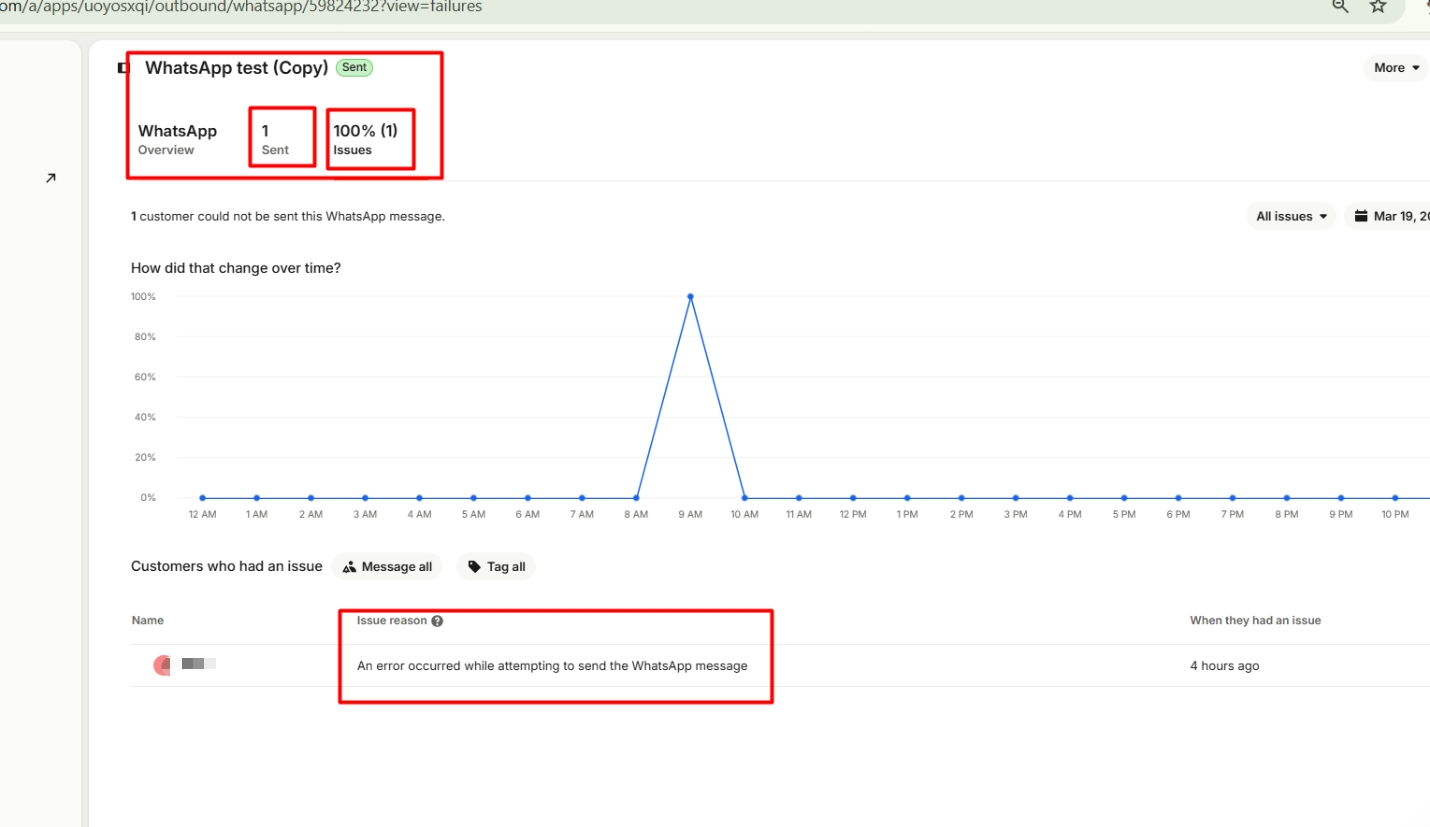
- Outbound Messaging shows “sent,” but customers do not receive the message
These problems not only consume team resources but may also lead to customer loss and disrupt business operations. Many teams suspect Intercom malfunctions, but the truth is: most root causes come from WhatsApp platform rules, not Intercom itself.
The Truth Revealed: Message Failures Stem from Platform Restrictions
The core reason is simple: it’s not that messages cannot be sent, but that your actions are restricted by the platform. Essentially, WhatsApp (Meta) rules or template validations are in effect, while Intercom is merely the interface for message operations and display.
After assisting many clients in troubleshooting such issues, the DKMECO technical team found that the vast majority of sending failures can be attributed to three core mechanisms of the WhatsApp (Meta) platform. Once you understand these mechanisms, most problems can be easily resolved.
01. Session Window Mechanism (24-Hour Rule)
This is the most basic and most commonly overlooked rule: if the customer does not reply within 24 hours, you cannot send regular messages and can only use approved template messages.
This is a strict WhatsApp rule and has nothing to do with the Intercom system itself. Many teams misinterpret this as a system failure, when in fact they have not fully understood this rule.
02. Template Mechanism (Dual Constraints: Approval + Usage)
Many assume that once a template is written and submitted, it can be used. In reality, template usage is subject to two constraints: it must pass Meta’s approval and also match the specific usage scenario. For example, whether the template meets category requirements (utility/marketing/authentication), and whether it contains variables or buttons, all affect its usability.
A common example: templates with variables or buttons often cannot be used as the first message in a new conversation. Many teams overlook this and mistakenly believe Intercom is at fault.
03. Sending vs. Delivery Mechanism (Most Misunderstood Point)
Many teams are confused when messages show “sent” in Intercom, but customers report not receiving them. It’s important to distinguish between two states: “sent” only means the message request has been submitted, while “delivered” means it has actually reached the customer.
Whether a message transitions from “sent” to “delivered” depends entirely on Meta’s delivery logic. Common causes of delivery failure include mismatched template variables, template sync issues, platform risk controls, or sending frequency limits.
DKMECO Practical Solutions: Common Error FAQ (Diagnosis + Fixes)
Understanding the cause is only the first step. The key is how to quickly resolve issues and avoid repeated mistakes. This is exactly where the DKMECO technical team provides value—not just explaining “why it failed,” but delivering actionable and repeatable solutions to turn message failures into efficient outreach.
Based on extensive troubleshooting experience, DKMECO has summarized 4 of the most common messaging issues in Intercom + WhatsApp usage. Each includes clear “Diagnosis” and “Solution” steps, allowing teams to resolve issues quickly without trial and error.
Q1. Why do I get a “message rate limited” error?
👉 Diagnosis:
This indicates the user has triggered WhatsApp (Meta)’s frequency limits for receiving template messages. This is often misunderstood—it is unrelated to how frequently you communicate with the user. Instead, it depends on how many marketing template messages the user has received across the entire WhatsApp ecosystem recently.
Even if you have little prior interaction with the user, or your current sending frequency is low, you may still be restricted. This is a user-level control mechanism set by Meta to prevent spam and excessive marketing, and has nothing to do with Intercom.
👉 Solution:
- Pause sending temporarily and retry later;
- Switch to alternative communication channels if possible;
- If still within the 24-hour window, send regular messages instead of templates;
- Long-term: reduce unnecessary marketing template messages to avoid overexposure.
👉 Recommendation:
First confirm whether you are sending a template message. This limit applies only to templates and does not affect regular messages within the 24-hour window.
– For more details on user-level limits for marketing templates, refer to:
https://developers.facebook.com/documentation/business-messaging/whatsapp/templates/marketing-templates/per-user-limits
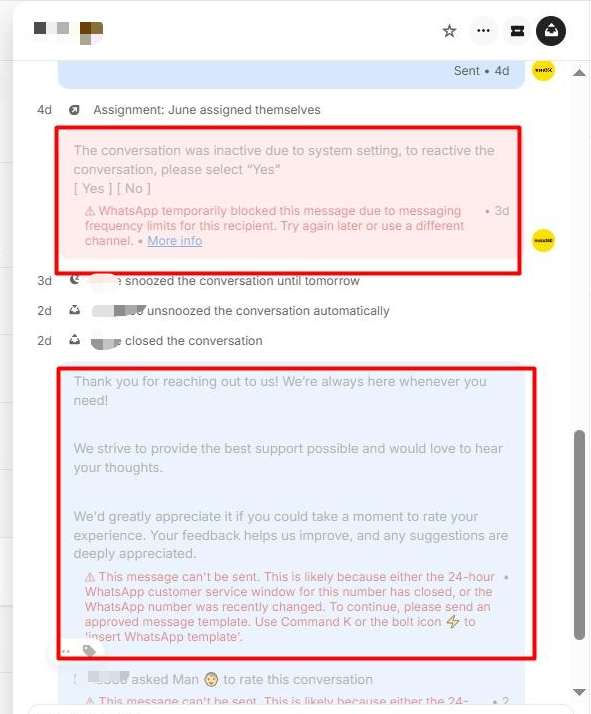
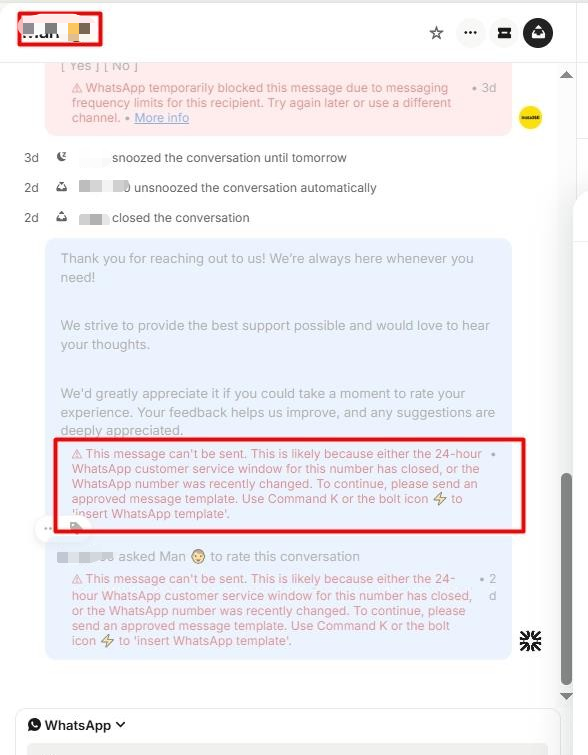
Q2. Why do I get a “24-hour window closed” error?
👉 Diagnosis:
This clearly indicates that the customer has not replied within the past 24 hours, causing the WhatsApp session window to close automatically.
According to WhatsApp rules: you can send regular messages within 24 hours of the user’s last reply; after that, only approved template messages can be sent. Once the user replies again, the session window reopens. This is a core WhatsApp rule, not an Intercom limitation.
👉 Solution:
- Switch to approved template messages to continue outreach;
- Wait for the customer to reply before resuming normal conversation;
- Optimize workflows by using templates for all “over 24 hours” scenarios.
👉 Recommendation:
Always check the customer’s last reply time. If it exceeds 24 hours, do not attempt regular messages—use templates directly.
– For more details on using WhatsApp in Intercom, refer to:
https://www.intercom.com/help/en/articles/9067468-whatsapp-faqs
Q3. Why can’t some templates be used when starting a new conversation from Inbox?
👉 Diagnosis:
When initiating a new WhatsApp conversation via Intercom Inbox, Meta imposes additional rules on the first message template. Not all approved templates can be used as the initial message.
The following types are more likely to be restricted:
- Templates with variable placeholders
- Templates with buttons such as quick replies
- Complex templates unsuitable for first contact
This is due to Meta’s conversation initiation rules, not an Intercom limitation.
👉 Solution:
Design dedicated templates for new conversations: no variables, no buttons, simple and clear content, preferably utility-type (notifications/service).
👉 Best Practice:
Separate templates into two categories:
- First-contact templates (for new conversations): simple structure, no variables or buttons;
- Standard templates (for follow-ups): can include variables and support complex interactions.
– For more details on sending WhatsApp outbound messages in Intercom, refer to:
https://www.intercom.com/help/en/articles/6808174-start-a-whatsapp-conversation
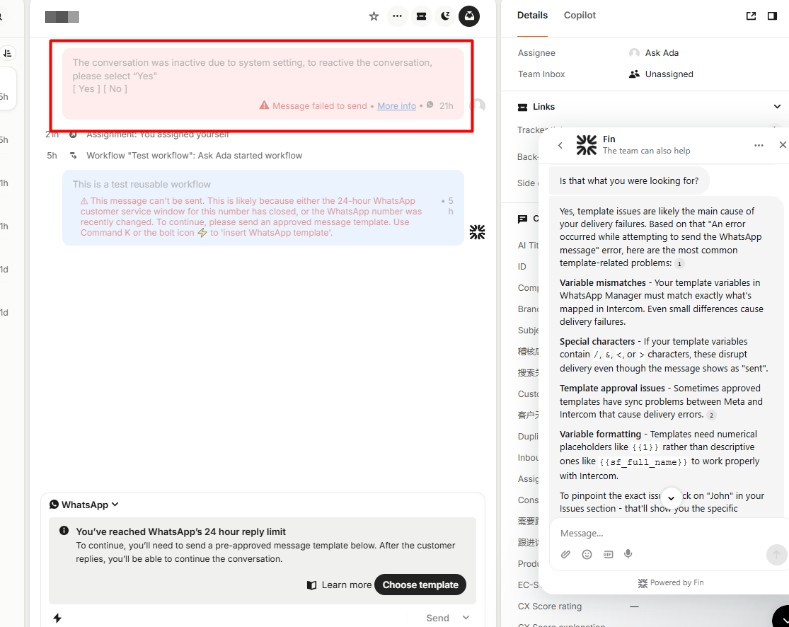
Q4. Why does the message show “sent” but the customer didn’t receive it?
👉 Diagnosis:
The key is distinguishing between “sent” and “delivered.” In Intercom, “sent” means the message has been submitted to Meta, but actual delivery depends on Meta’s final decision.
Common reasons for non-delivery include:
- Template variable mismatch (most common)
- Template approval or sync issues
- Template not suitable for the scenario (e.g., variable template used as first message)
- Meta-side risk control or technical issues
Always investigate templates and platform rules first before assuming system failure.
👉 Solution:
Check these three areas to quickly identify the issue:
- Intercom: Outbound → Messages → Issues tab for error messages;
- WhatsApp Manager: verify template status, variables, and logs;
- Ensure the template matches the current use case.
👉 Recommendation:
For “sent but not delivered,” focus on template structure, variable mapping, and Meta delivery status to quickly find the root cause.
– For more WhatsApp troubleshooting details, refer to:
https://www.intercom.com/help/en/articles/9230920-troubleshooting-whatsapp-errors
Long-Term Optimization: 3 Tips to Prevent Recurring Issues
Solving current issues is just the first step. DKMECO focuses on helping clients prevent problems from recurring. Based on experience with hundreds of clients, we recommend three practical strategies:
01. Layered Template Design (Most Important)
Split templates into at least four types: first-contact templates, post-24-hour follow-ups, verification/security templates, and notification templates.
02. Control Template Complexity
Avoid variables and buttons in first messages. Keep content simple to improve approval and delivery success rates.
03. Establish Internal SOP for Troubleshooting
Standardize the process: check 24-hour window → message type → template status → variable mapping → logs.
DKMECO’s Core Value: Beyond Problem Solving
Intercom + WhatsApp is inherently powerful. Frequent issues arise from misalignment between platform rules, business processes, and template design. DKMECO helps bridge this gap, turning troubleshooting into capability building.
Among our clients, many improved their delivery success rate from below 60% to over 95%, achieving:
- Higher message delivery success rates
- Reduced communication costs
- Improved customer experience
Skip Trial and Error — Let DKMECO Optimize Your Workflow
Intercom is just the interface—the real determinant of message success is WhatsApp (Meta) rules. DKMECO helps you navigate these complexities efficiently.
If your team is struggling with message failures or evaluating solutions, we can help you optimize processes and achieve seamless integration across communication channels.
We also provide comprehensive Intercom technical consulting services, including configuration, optimization, and troubleshooting, helping businesses maximize value and efficiency.
If you want to experience AI-powered customer service and automation, click to apply for a free Intercom trial!
As an official Intercom partner in China, DKMECO provides consulting, deployment, and technical support services to ensure efficient and secure usage.
🌍 Intercom Gold Partner in China, serving thousands of APAC clients
🚀 Specialized in enterprise integration and localization of Intercom AI customer service
🔑 35+ industry solutions combining automation and analytics
📈 Sales, training, and system optimization services
🌐 Modern tech stack with cloud, SaaS, BI, big data, and generative AI
👉 Copy the link below to view DKMECO on the Intercom partner page:
https://www.intercom.com/solution-partner-program